


In the fast-paced environment of modern software engineering, the debate over documentation often centers on a single question: does it help or hurt? For junior developers joining a team, the introduction of Unified Modeling Language (UML) diagrams can feel like a roadmap or a barrier. The assumption that extensive documentation automatically slows down velocity is a common narrative. However, reality is more nuanced. This guide examines the relationship between UML, documentation depth, and the actual speed at which new engineers contribute value.
🧩 Understanding the Core Conflict
Velocity is a metric used to measure the rate at which a development team completes work. It is often conflated with speed, but true velocity is about sustainable output. When we introduce UML, we introduce a layer of abstraction. For a senior engineer who understands the system architecture, a class diagram might save hours of code reading. For a junior developer, the same diagram might introduce confusion if it does not align with the code.
- Velocity: The amount of value delivered over time.
- Documentation: Static representations of dynamic systems.
- UML: A standardized visual language for specifying, constructing, and documenting artifacts.
The friction arises when documentation becomes a requirement for understanding rather than a tool for communication. If a junior developer must read a twenty-page specification before writing a single line of code, their velocity drops. If they use a simple sequence diagram to understand a specific flow, velocity may increase.
📉 The Junior Developer Context
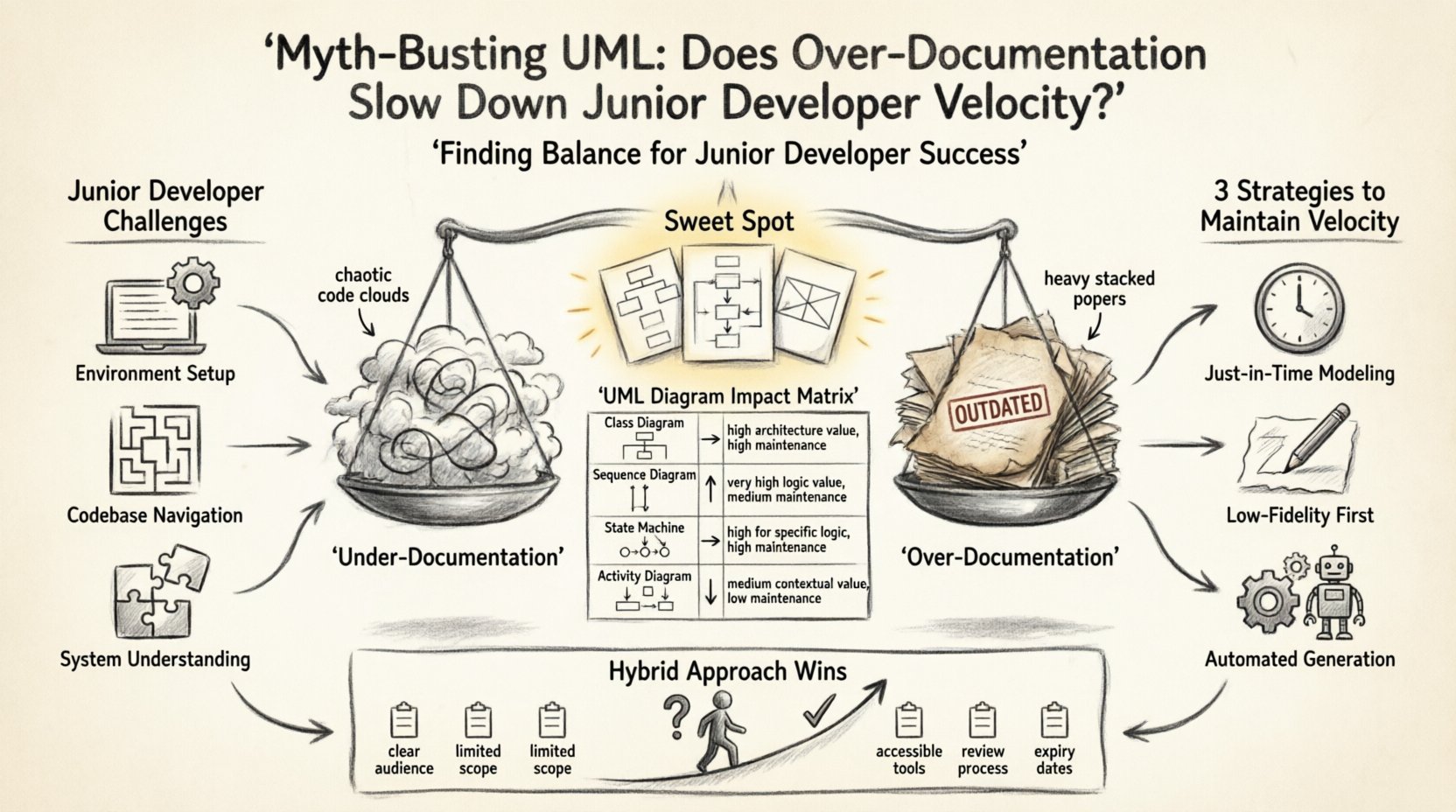
Junior developers are in a unique learning phase. They are not just building features; they are building a mental model of the codebase. This cognitive load is significant. When a new engineer joins, they face three primary hurdles:
- Environment Setup: Getting the project to run locally.
- Codebase Navigation: Finding where logic exists.
- System Understanding: Knowing how components interact.
UML addresses the third hurdle. However, the quality of the UML matters immensely. A diagram that is outdated or overly complex adds to the cognitive load rather than reducing it.
🧠 Cognitive Load Theory
Cognitive load refers to the total amount of mental effort being used in the working memory. For a junior developer, working memory is a limited resource. They are simultaneously learning syntax, framework conventions, and business logic.
If you present a complex state machine diagram that covers the entire application lifecycle, you are consuming their working memory. If you present a focused sequence diagram for a specific API endpoint, you are scaffolding their learning. The former slows velocity; the latter accelerates it.
📊 The Over-Documentation Trap
There is a distinct line between helpful documentation and over-documentation. Over-documentation occurs when the effort to maintain the documentation exceeds the value it provides. In many cases, diagrams become stale because the code changes faster than the modeling tools.
Consider the scenario where a team mandates high-fidelity UML for every feature before coding begins. This is often referred to as Big Design Up Front (BDUF). While this reduces ambiguity, it creates a bottleneck. Junior developers wait for specs. Senior developers write specs. The feedback loop lengthens.
Conversely, under-documentation leaves juniors to reverse-engineer the system from code. This is also time-consuming. The goal is a balance.
📋 Documentation Styles Comparison
Different types of documentation serve different purposes. Not all UML diagrams are created equal. Here is a breakdown of how specific diagram types impact a junior developer’s workflow.
| Diagram Type | Best Use Case | Impact on Velocity | Maintenance Effort |
|---|---|---|---|
| Class Diagram | Static structure, relationships | High (for architecture) | High (refactors break it) |
| Sequence Diagram | Interactions, API flows | Very High (for logic) | Medium (code changes often) |
| State Machine | Complex object lifecycles | High (for specific logic) | High (state changes are frequent) |
| Activity Diagram | Business process flows | Medium (contextual) | Low (business rules stable) |
⚙️ Why Velocity Slows Down
When velocity suffers due to documentation, it is usually due to one of three factors. Identifying these helps teams adjust their approach.
- Sync Friction: Developers spend time updating diagrams instead of writing code. If the diagram is the source of truth, coding becomes a secondary task.
- Obsolescence: Juniors read a diagram, find it does not match the code, and lose trust in the documentation. They then ignore it entirely.
- Complexity Creep: Diagrams become too detailed. A simple login flow is modeled with fifty boxes. This obscures the actual logic.
For a junior developer, trust in the documentation is critical. If the documentation is wrong, they waste time debugging the spec rather than the code. This creates a negative feedback loop where velocity plummets.
🚀 Strategies to Maintain Velocity
To ensure UML aids rather than hinders, teams must adopt specific practices. These strategies focus on utility over formality.
1. Just-in-Time Modeling
Do not model everything before writing code. Model what is needed to solve the current problem. If a feature requires understanding how data moves between services, draw a sequence diagram. If it is a simple CRUD operation, a class diagram may be sufficient.
- Create diagrams when the complexity exceeds verbal description.
- Discard diagrams once the feature is merged and stable.
- Keep diagrams close to the codebase, not in a separate repository.
2. Low-Fidelity First
Start with sketches. Use whiteboards or simple digital tools to convey the idea. High-fidelity diagrams imply permanence. Low-fidelity diagrams imply discussion. This reduces the pressure to get the diagram perfect before starting work.
3. Automated Diagram Generation
Whenever possible, generate diagrams from code. Tools exist that can read the codebase and output class diagrams. This ensures the documentation is always in sync with the implementation. However, generated diagrams can be noisy. They require cleanup to be useful for juniors.
🔍 The Maintenance Tax
Documentation is code that nobody executes. It still requires review, version control, and maintenance. For a junior developer, understanding the documentation model is part of their learning curve. If the documentation model is complex, they spend time learning the model instead of the domain.
The Maintenance Tax is the hidden cost of keeping documentation accurate. If the tax is high, the team cannot sustain it. Velocity drops because the team is constantly updating artifacts that provide diminishing returns.
✅ Checklist for Effective UML Implementation
Before introducing UML to a team, evaluate the following criteria. This ensures the practice adds value.
- Is the audience clear? Are these diagrams for architects, seniors, or juniors?
- Is the scope limited? Are we modeling the whole system or a specific module?
- Is the tool accessible? Can everyone open and edit the files easily?
- Is there a review process? Who checks if the diagram matches the code?
- Is there an expiry? Does the diagram have a lifecycle?
🌱 Onboarding Scenarios
Onboarding is the most critical time for junior developer velocity. The goal is to get them to their first commit as quickly as possible.
Scenario A: No Documentation
- Junior dev spends 2 weeks reading code.
- High risk of misunderstanding architectural intent.
- Low velocity initially, stabilizes later.
Scenario B: Heavy UML
- Junior dev spends 2 weeks reading diagrams.
- Diagrams may be outdated by week 2.
- High initial velocity, but confidence issues arise.
Scenario C: Hybrid Approach
- Junior dev gets a high-level architecture diagram.
- Specific sequence diagrams for key flows are provided.
- Velocity ramps up faster with sustained accuracy.
🛠️ Practical Implementation Steps
Teams looking to optimize their documentation strategy should follow a phased approach. This minimizes risk and allows for feedback.
- Assess Current State: Look at existing diagrams. Are they used? Are they updated?
- Define Standards: Agree on a notation standard (e.g., UML 2.0).
- Limit Scope: Start with Class and Sequence diagrams only.
- Integrate into Workflow: Require diagrams only for complex pull requests.
- Monitor Metrics: Track time to first commit and bug rates related to architecture.
💡 The Role of Code as Documentation
It is important to acknowledge that code is the ultimate source of truth. UML supports the code, it does not replace it. Clear variable names, modular functions, and inline comments often serve the junior developer better than a static diagram.
If a junior developer can understand the system by reading the code, UML becomes a luxury. If the system is too complex for a single file, UML becomes a necessity. The key is knowing when to switch between the two modes.
📈 Measuring Success
How do you know if your documentation strategy is working? Look for these indicators over a quarter:
- Reduced Onboarding Time: New hires reach productivity faster.
- Fewer Architectural Bugs: Less rework due to misunderstanding system design.
- Higher Code Quality: PR reviews focus on logic, not structure.
- Team Satisfaction: Engineers feel supported, not bogged down.
🔄 Adapting to Change
Software development is not static. Requirements change. Teams grow. What worked for a startup of five engineers may not work for an enterprise of fifty. The documentation strategy must evolve alongside the organization.
Regular retrospectives should include a discussion on documentation. Ask the team:
- Did we use the diagrams this sprint?
- Did we spend time updating them?
- Did the diagrams prevent confusion?
This feedback loop ensures that documentation remains a tool for velocity, not a burden.
🏁 Final Thoughts
The relationship between UML and developer velocity is not linear. It is contextual. Over-documentation slows down juniors by creating noise and maintenance overhead. Under-documentation slows them down by creating ambiguity. The sweet spot lies in targeted, living documentation that supports the learning curve without becoming the bottleneck.
By focusing on utility, maintaining synchronization with the code, and respecting the cognitive load of new engineers, teams can harness the power of UML without sacrificing speed. The goal is not to document everything, but to document what matters.