


System analysis requires precision. When modeling software architecture, clarity is paramount. Unified Modeling Language (UML) Class Diagrams serve as the structural blueprint for object-oriented systems. They define the static structure of a system, outlining objects, their attributes, methods, and relationships. For intermediate analysts, moving beyond basic shapes into semantic depth is essential. This guide dissects every component of a class diagram, providing the technical rigor needed for effective design.
Understanding the Class Box Structure 📦
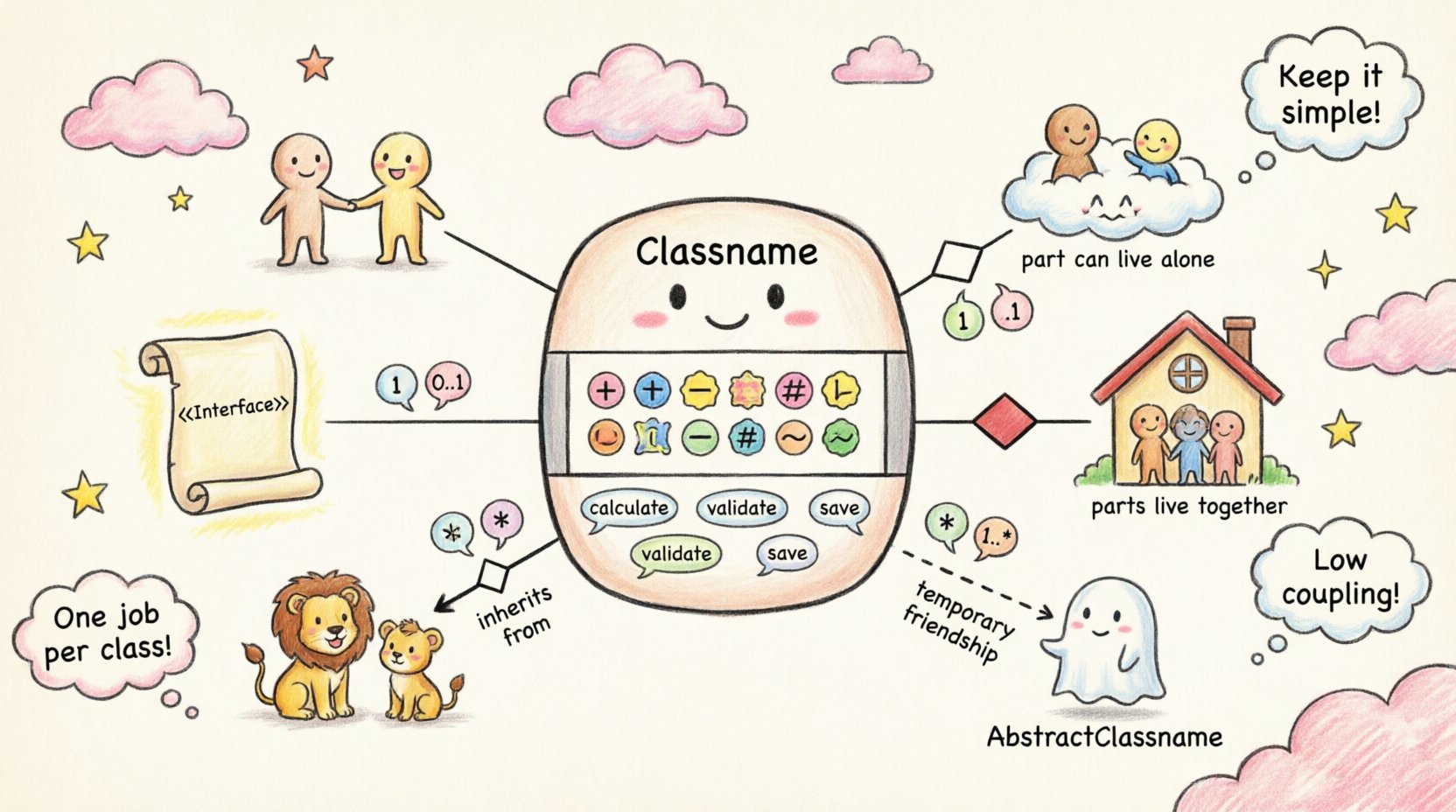
The class box is the fundamental building block. It represents a blueprint from which objects are instantiated. A standard class diagram box is divided into three compartments.
- Top Compartment: Contains the class name. This should be capitalized, typically using PascalCase.
- Middle Compartment: Lists attributes (data fields) belonging to the class.
- Bottom Compartment: Lists operations (methods) available to interact with the class.
Visual hierarchy matters. The class name must be prominent. If a class is abstract, the name is often italicized. If it is a concrete class, the name remains standard. Analysts must distinguish between these states to understand instantiation rules.
Class Identification Rules 🔍
- Names must be nouns, representing entities within the domain.
- Names should be specific. Avoid generic terms like “Data” or “Info”.
- Consistency is key. Use the same terminology across the entire diagram set.
- Pluralization is generally avoided in class names, though acceptable for collections like “OrderLineItems”.
Attributes and Operations 🔍
The middle and bottom sections define the internal behavior and state of the class. Precision here prevents ambiguity during implementation.
Attributes (The Middle Section) 📝
Attributes represent the data state. They define what a class knows about itself. Each attribute entry typically includes a visibility modifier, the attribute name, and optionally, a data type.
- Visibility Modifiers: Symbols dictate access control.
- Name: The variable identifier, usually camelCase.
- Type: The data format (e.g., Integer, String, Boolean).
- Default Value: Optional, indicated by an equals sign (e.g.,
status = "Pending").
| Symbol | Visibility | Definition |
|---|---|---|
+ |
Public | Accessible from any other class. |
- |
Private | Accessible only within the class itself. |
# |
Protected | Accessible within the class and its subclasses. |
~ |
Package | Accessible by any class in the same package. |
Operations (The Bottom Section) ⚙️
Operations define the behavior. They are the functions or methods that manipulate attributes. An operation signature includes the operation name, parameters, and return type.
- Name: Typically a verb (e.g.,
calculateTotal). - Parameters: Listed within parentheses, separated by commas. Include type and name.
- Return Type: Listed after a colon (e.g.,
: Double). - Static Operations: Denoted by underlining the operation name. These belong to the class, not a specific instance.
Relationships and Connectivity 🔗
Classes do not exist in isolation. Relationships define how classes interact. Understanding the specific semantics of each relationship is critical for accurate modeling.
1. Association 🔗
An association represents a structural link between instances of classes. It implies that objects are connected. A simple solid line connects two classes.
- Direction: Can be unidirectional or bidirectional.
- Role Names: Labels placed near the ends of the line describe the perspective of the association.
- Navigation: Determines which class knows about the other.
2. Aggregation vs. Composition 💎
These are specialized forms of association known as “has-a” relationships. The distinction lies in lifecycle management.
Aggregation (Hollow Diamond):
- Represents a weak relationship.
- The part can exist independently of the whole.
- Example: A Department has Employees. If the Department dissolves, the Employees still exist.
Composition (Filled Diamond):
- Represents a strong relationship.
- The part cannot exist without the whole.
- Example: A House has Rooms. If the House is demolished, the Rooms cease to exist in that context.
- Visual cue: A solid black diamond on the whole side of the line.
3. Generalization / Inheritance 👇
Generalization defines an “is-a” relationship. A subclass inherits attributes and operations from a superclass.
- Visual: A solid line with a hollow triangle arrow pointing to the superclass.
- Polymorphism: Allows objects of subclasses to be treated as objects of the superclass.
- Abstraction: The superclass often contains common logic, while subclasses add specificity.
4. Dependency 🔄
Dependency is a weaker relationship indicating that one class uses another. It is a temporary relationship.
- Visual: A dashed line with an open arrowhead.
- Usage: Often occurs when a class uses a parameter, a local variable, or a static method of another class.
- Lifecycle: Changing the dependent class does not necessarily affect the usage class, but the reverse is often true.
Multiplicity and Cardinality 🔢
Multiplicity defines how many instances of one class relate to instances of another. This is crucial for database schema design and business logic enforcement.
- One: Denoted by
1. - Zero or One: Denoted by
0..1. - Zero or More: Denoted by
0..*or0..n. - One or More: Denoted by
1..*or1..n. - Specific Range: Denoted by
3..5. - Any Number: Denoted by
*.
Position matters. Multiplicity is placed at both ends of the association line. The multiplicity at the end of the line describes how many objects of that class participate in the relationship.
| Cardinality | Meaning | Example Context |
|---|---|---|
| 1 | Exactly one | A Person has exactly one Passport. |
| 0..1 | Optional | A Student may have a Mentor (optional). |
| 1..* | Required many | A Course requires at least one Instructor. |
| 0..* | Optional many | A Customer may have zero or more Orders. |
Interfaces and Abstract Classes 🔌
Advanced system analysis often requires distinguishing between implementation and specification.
Interfaces
An interface defines a contract without implementation. It specifies operations that must be present in implementing classes.
- Visual: The class name is often preceded by <
> or the word “Interface”. - Implementation: Classes implement an interface using a dashed line with a hollow triangle arrow.
- Purpose: Decouples the system. It allows different classes to be swapped without changing the structure.
Abstract Classes
An abstract class cannot be instantiated directly. It serves as a base for other classes.
- Visual: The class name is italicized.
- Attributes: May contain both abstract and concrete methods.
- Usage: Used when sharing code across multiple subclasses.
Design Heuristics for Analysts 🧠
Creating a diagram is one task; creating a useful one is another. Follow these principles to ensure clarity.
- Granularity: Do not create too many classes. Group related functionality. If a class has more than 10 attributes, consider splitting it.
- Cohesion: Ensure a class has a single responsibility. If a class handles both data storage and UI rendering, it violates cohesion.
- Coupling: Aim for low coupling. Minimize direct dependencies between classes to improve maintainability.
- Readability: Arrange classes logically. Place related classes near each other to reduce line crossings.
- Documentation: Use notes to explain complex logic or business rules that cannot be expressed through standard symbols.
Common Pitfalls to Avoid ⚠️
Even experienced analysts make mistakes. Awareness prevents rework later in the development lifecycle.
- Over-Engineering: Do not model every possible edge case in the initial design. Focus on the happy path first.
- Ignoring Multiplicity: Forgetting to specify cardinality leads to ambiguous database constraints.
- Mixing Levels: Do not mix conceptual domain models with implementation details (like database keys) in the same view.
- Redundant Relationships: Avoid creating relationships that can be derived from transitivity. If A relates to B, and B relates to C, check if A needs a direct link to C.
- Naming Confusion: Do not use the same name for a class and an attribute. This causes confusion during code generation.
Advanced Notation Details 📐
Certain scenarios require specific notation nuances.
Ordered vs. Unordered Collections
When modeling collections (e.g., a List of Items), specify if the order matters.
- Ordered: Add the keyword
Orderedin the multiplicity area. - Unordered: Add the keyword
UnorderedorSet.
Attributes with Constraints
Constraints can be added using curly braces. This is useful for defining validation rules.
- Example:
price {price > 0} - Example:
status {status = "Active" OR "Inactive"}
Conclusion on Structure 🏁
UML Class Diagrams are more than just drawings; they are a communication tool between stakeholders and developers. By adhering to standard notation and understanding the semantic weight of each component, system analysts ensure that the design translates correctly into functional code. Precision in attributes, relationships, and multiplicity reduces ambiguity. This foundation supports scalability and maintainability throughout the software lifecycle. Focus on clarity, consistency, and structural integrity to produce diagrams that stand the test of time.
Related posts:
 Best Practices for UML Deployment Diagrams: Optimizing Infrastructure Visualization for Large Teams
 Comprehensive Walkthrough of UML Communication Diagrams: Simplifying Distributed System Logic
 Q&A on UML Generalization: Clarifying Confusion Around Inheritance and Polymorphism
 Future Outlook of UML: Integrating Diagrams into Automated Code Review Workflows