Modernizing legacy systems is often described as moving a ship while it is still sailing. The complexity of decades-old code, undocumented processes, and intertwined dependencies creates a high-risk environment for technical teams. In this landscape, clarity is the most valuable currency. One specific artifact stands out as a critical tool for achieving that clarity: the Data Flow Diagram, or DFD. While often associated with initial system design, its application in modernization projects offers profound advantages that are frequently overlooked.
Data Flow Diagrams provide a visual representation of how information moves through a system. They map inputs, processes, data stores, and outputs without getting bogged down in implementation details. When applied to legacy modernization, they serve as a bridge between the old architecture and the new. This guide explores the technical and strategic advantages of utilizing DFDs to navigate complex migration paths.
🧩 The Complexity Challenge in Legacy Environments
Legacy systems are rarely simple. They accumulate technical debt over years of patching, feature additions, and personnel turnover. The codebase often reflects the history of the organization rather than current business needs. Key challenges include:
- Hidden Dependencies: Functions may call other functions in unexpected ways, creating a web of interconnections that are hard to trace.
- Outdated Documentation: Paper trails may be lost, or documentation may contradict the actual behavior of the code.
- Spaghetti Logic: Business rules are often buried within procedural code rather than being separated into distinct services or modules.
- Knowledge Silos: Only a few senior engineers understand the original logic, creating a single point of failure.
Attempting to refactor without a clear map of data movement is akin to remodeling a house without a blueprint. You might accidentally remove a load-bearing wall. A Data Flow Diagram acts as that blueprint, focusing specifically on the flow of information rather than the physical structure of the code.
🛠️ Core Benefits of Using DFDs for Modernization
The application of DFDs during a migration project is not just about drawing pictures. It is a rigorous analytical exercise that yields tangible benefits across the project lifecycle.
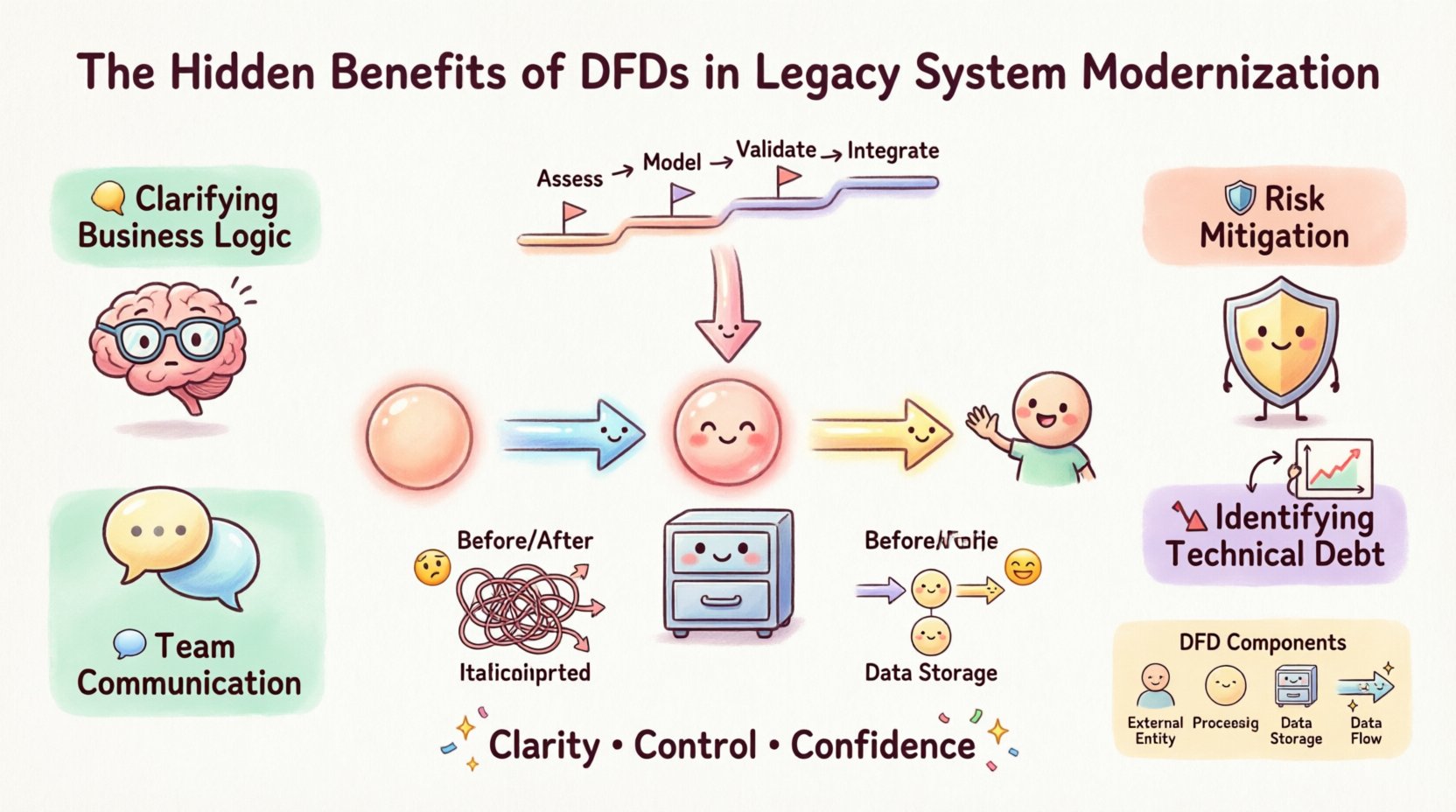
1. Clarifying Business Logic 🧠
Code tells you how the system works, but a DFD reveals what the system does. By stripping away syntax and language specifics, architects can focus on the transformation of data. This allows stakeholders to verify that the modernization effort preserves critical business rules.
- Identify where data is created, modified, or deleted.
- Verify that all required inputs are accounted for.
- Ensure that outputs align with current reporting needs.
2. Risk Mitigation in Migration 🛡️
Migration projects often fail due to data loss or corruption. A DFD helps visualize where data persists and how it is accessed. This visibility allows teams to plan data migration strategies more effectively.
- Pinpoint sensitive data stores that require special handling.
- Identify potential bottlenecks in data transfer.
- Assess the impact of changing storage technologies.
3. Facilitating Team Communication 🗣️
Developers, business analysts, and project managers often speak different languages. A DFD serves as a universal visual language. It removes ambiguity regarding process boundaries and data ownership.
- Aligns technical teams on the scope of the migration.
- Helps non-technical stakeholders understand the changes.
- Reduces rework caused by misunderstood requirements.
4. Identifying Technical Debt 📉
When mapping data flows, inefficiencies become obvious. You may find redundant processes, circular data loops, or orphaned data stores that no longer serve a purpose. This insight allows for a cleaner modernization effort.
- Eliminate obsolete data paths.
- Consolidate redundant processing steps.
- Streamline the overall architecture.
📐 Understanding the DFD Structure
To utilize DFDs effectively, one must understand the fundamental components. These elements remain consistent regardless of the methodology used.
- External Entities: Sources or destinations of data outside the system (e.g., a user, an external API, a database).
- Processes: Transformations that change input data into output data. These are often represented as bubbles or circles.
- Data Stores: Places where information is saved for later retrieval, such as files or databases.
- Data Flows: The movement of data between entities, processes, and stores, indicated by arrows.
In a legacy context, the “Processes” are often the hardest to define. They may represent complex scripts or batch jobs that need to be broken down into microservices or cloud-native functions.
📊 Comparative Analysis: Legacy State vs. DFD Clarity
Visualizing the difference between a system without a map and one with a DFD helps illustrate the value proposition.
| Aspect | Without DFD Analysis | With DFD Analysis |
|---|---|---|
| Scope Definition | Unclear boundaries; scope creep is common. | Clear boundaries; inputs and outputs are defined. |
| Data Integrity | High risk of data loss during migration. | Traceable paths ensure data consistency. |
| Team Alignment | Reliance on tribal knowledge and verbal agreements. | Shared visual reference point for all stakeholders. |
| Refactoring Effort | High; often requires rework due to missed dependencies. | Targeted; only necessary changes are made. |
| Testing Strategy | Generic testing based on guessed scenarios. | Specific testing based on mapped data paths. |
🚀 Implementation Strategy for DFDs
Creating a DFD for a modernization project requires a methodical approach. It is not a one-time drawing exercise but a living artifact that evolves with the project.
Phase 1: Context Diagramming
Start with a high-level view. Identify the system as a single process and map the external entities interacting with it. This establishes the boundary of the modernization effort.
- List all external users and systems.
- Define the major data inputs entering the system.
- Define the major outputs leaving the system.
Phase 2: Level 0 Decomposition
Break the main process into major sub-processes. This level reveals the major functional areas without getting into the weeds.
- Group related functions together.
- Identify major data stores associated with each group.
- Map the flow between major functional groups.
Phase 3: Level 1 and 2 Detail
Drill down into specific processes. This level is crucial for understanding the actual logic that needs to be migrated or rewritten.
- Detail specific transformations.
- Identify validation rules within the flow.
- Map internal data stores used by specific functions.
Phase 4: Validation and Review
Review the diagrams with subject matter experts. The goal is to confirm that the diagram matches the actual behavior of the legacy system.
- Walk through the diagram with legacy code walkthroughs.
- Check for missing flows or orphaned processes.
- Update the diagram as new information is discovered.
⚠️ Common Pitfalls to Avoid
Even with a solid strategy, teams often make mistakes when creating these diagrams. Awareness of these pitfalls can save significant time and effort.
- Over-complication: Trying to map every single line of code destroys the utility of the diagram. Focus on the flow, not the implementation.
- Ignoring Control Flow: DFDs focus on data, but control signals matter. Ensure you distinguish between data moving and commands triggering actions.
- Static Documentation: Treating the diagram as a static document leads to drift. It must be updated as the migration progresses.
- Lack of Granularity: If a process is too broad, it becomes useless for migration planning. Break it down until the logic is clear.
🔗 Integrating DFDs with Modern Architecture
Modernization often involves shifting from monolithic structures to distributed architectures, such as microservices or serverless functions. DFDs are particularly useful here because they decouple logic from technology.
Mapping to Microservices
When decomposing a monolith, the DFD helps identify service boundaries. Processes that share data frequently and have stable interfaces make good candidates for independent services.
- Identify cohesive groups of processes.
- Minimize data coupling between groups.
- Define clear API contracts based on data flows.
Cloud Migration Considerations
When moving to the cloud, data residency and latency become factors. The DFD highlights where data is stored and accessed, helping architects decide which data should stay on-premise and which can move to cloud storage.
- Locate high-volume data stores.
- Identify real-time processing needs.
- Plan for network bandwidth based on flow volume.
📈 Measuring Success and Impact
How do you know if using DFDs improved the modernization project? Success is measured through specific metrics related to risk, efficiency, and quality.
- Defect Rate: Did the number of bugs found during testing decrease after mapping flows?
- Timeline Adherence: Were estimates more accurate when based on the visual map?
- Stakeholder Confidence: Did business leaders feel more assured about the migration process?
- Documentation Completeness: Was the final documentation more accurate and easier to maintain?
🛠️ Technical Deep Dive: Data Stores and Flows
In legacy systems, data stores are often the biggest source of friction. They may be relational databases, flat files, or even mainframe datasets. A DFD forces a clear distinction between where data lives and how it moves.
Consider a scenario where a legacy system reads a flat file, processes it, and writes to a database. In a modernization context, this might become an API call to a cloud service. The DFD ensures that the logical flow remains intact even if the physical storage changes.
Key considerations for data stores include:
- Consistency: Does the data store need to be transactional?
- Availability: How often is the data accessed?
- Security: Who has access to the data in the flow?
By explicitly mapping these stores, architects can plan for migration strategies like database replication, schema evolution, or data migration scripts without losing track of the data lineage.
🔄 Continuous Validation
The modernization process is iterative. As code is written and tested, the DFD should be validated against the reality of the new system. This continuous loop ensures that the design intent matches the implemented reality.
- Conduct regular diagram reviews during sprint planning.
- Update the diagram when requirements change.
- Use the diagram as a guide for regression testing.
This approach prevents the drift that often occurs in long-term projects. It keeps the team focused on the actual data movement rather than just the code structure.
🌐 The Human Element of Data Flow
While DFDs are technical tools, they serve a human purpose. They reduce anxiety among teams who are tasked with maintaining systems they did not build. Seeing the logic laid out clearly provides a sense of control and understanding.
- New hires can onboard faster with visual aids.
- Support teams can troubleshoot issues by tracing data paths.
- Decision makers can visualize the impact of changes.
Reducing the cognitive load on the team is a significant benefit. It allows engineers to focus on solving problems rather than deciphering the system.
🎯 Final Thoughts on Strategic Visualization
Legacy modernization is a complex endeavor that requires precision. Relying solely on code analysis or verbal descriptions leaves gaps that can lead to failure. Data Flow Diagrams fill those gaps by providing a structured view of information movement.
They enable teams to:
- Understand the current state accurately.
- Plan the future state with confidence.
- Execute the migration with reduced risk.
- Maintain the system more effectively after launch.
Investing time in creating and maintaining these diagrams pays dividends throughout the project lifecycle. It transforms a chaotic migration into a structured engineering challenge. By focusing on the flow of data, organizations can modernize their systems without losing the business value embedded within them.
The hidden benefits of DFDs are not just about documentation; they are about clarity, control, and confidence. In a world where technical debt is high and change is constant, these benefits are essential for sustainable growth.