


Enterprise software projects often stumble before they even begin. The culprit is rarely a lack of technology or budget. Instead, it is the fog of ambiguous requirements. When stakeholders describe functionality in natural language, interpretations diverge. Developers build one thing, testers verify another, and the business ends up with a system that does not align with operational needs.
This article explores a practical application of UML Use Cases to clarify these ambiguities. By shifting from text-heavy specifications to visual models, teams can establish a shared understanding. We will examine a scenario involving a complex financial ledger system and detail how structured modeling resolved critical confusion.
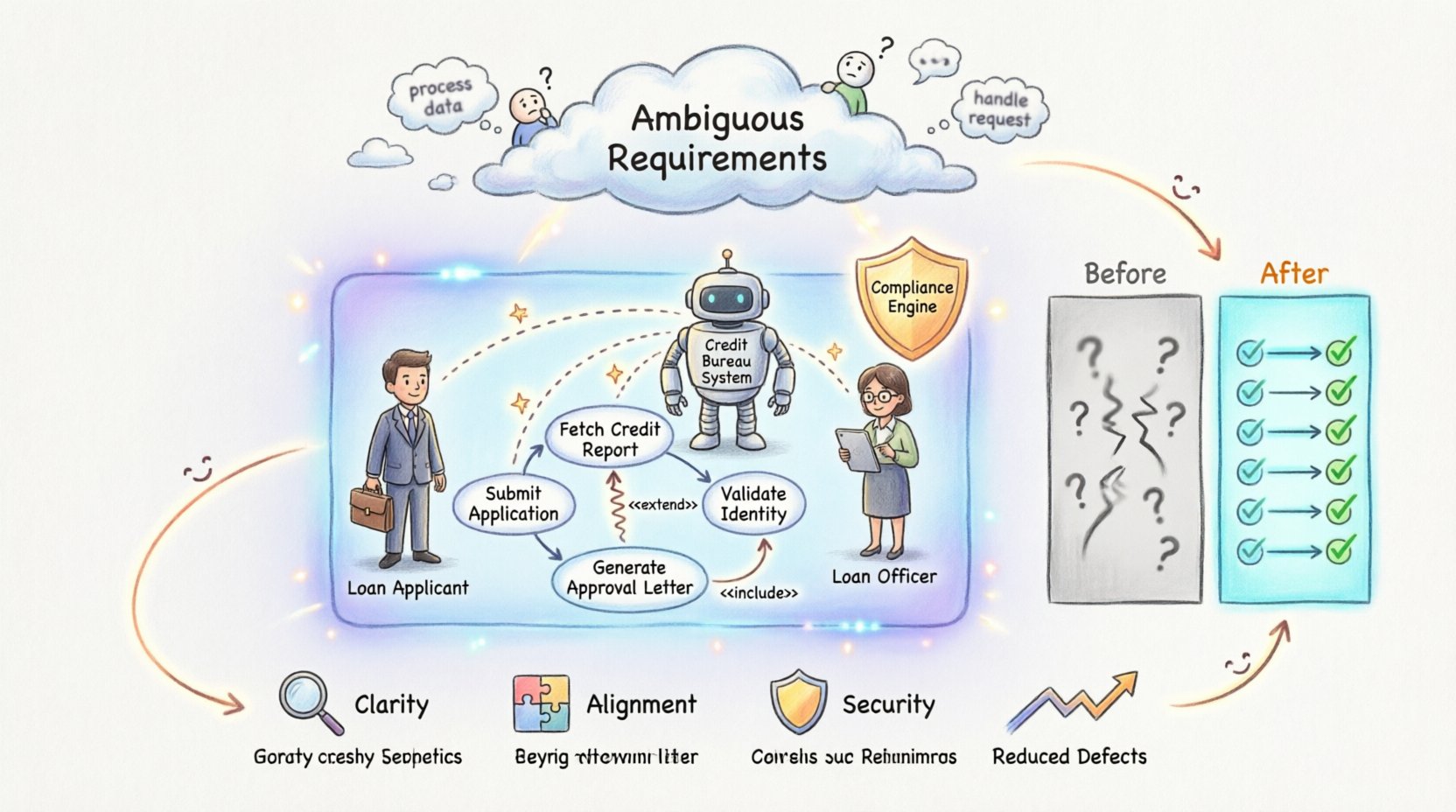
🧐 The Challenge: Text-Based Ambiguity in Enterprise Systems
Large-scale applications involve multiple departments: finance, operations, compliance, and IT. Each group speaks a different dialect. When requirements are captured solely in documents, the risk of misinterpretation increases exponentially.
Consider the following common pitfalls found in enterprise specifications:
- Imprecise Verbs: Phrases like “process the data” or “handle the request” lack specific conditions.
- Missing Actors: Specifications often forget secondary users or automated triggers.
- Hidden Exceptions: Text documents focus on the “happy path” (success) and ignore error states.
- Scope Creep: Without clear boundaries, features are added without understanding their impact on the core flow.
In the case study below, a legacy system migration project faced these exact issues. The goal was to modernize a transaction processing engine without disrupting daily operations.
🛠️ Understanding UML Use Cases
Unified Modeling Language (UML) Use Case diagrams provide a high-level view of system functionality. They focus on what the system does, not how it does it. This separation is vital for requirement analysis.
A standard Use Case model consists of three core elements:
- Actors: External entities that interact with the system. These can be humans (users) or other systems.
- Use Cases: Specific goals or tasks the actor wants to achieve within the system.
- Relationships: Lines connecting actors to use cases, indicating interaction. Special relationships include Include (mandatory sub-function) and Extend (optional behavior).
By mapping these elements, teams visualize the scope of the application. It forces the question: “Who is doing this, and what are they trying to achieve?”
🏢 The Case Study Scenario
Project Context: A global financial institution needed to upgrade its loan approval system.
The Problem: The initial requirement document stated: “The system shall verify applicant data and approve loans based on risk criteria.”
This single sentence contained massive ambiguity:
- Who verifies the data? A human or the software?
- What constitutes “risk criteria”?
- What happens if the data is missing?
- Does the system notify the applicant?
Without resolution, the development team would have to make assumptions. In a regulated industry, assumptions are dangerous.
📝 Step-by-Step Application of Use Cases
To resolve the ambiguity, the analysis team adopted a structured approach using UML modeling.
1. Identifying Actors
The first step was to list every entity interacting with the loan system. This often reveals hidden dependencies.
- Loan Applicant: The individual requesting the funds.
- Loan Officer: The internal employee reviewing the file.
- Credit Bureau System: An external database providing credit scores.
- Compliance Engine: An automated system checking for regulatory violations.
2. Defining Use Cases
Next, we defined specific goals for each actor. This broke the vague “verify data” statement into actionable items.
- Submit Application: The applicant provides initial details.
- Fetch Credit Report: The system requests data from the Credit Bureau.
- Review Application: The Loan Officer evaluates the risk.
- Generate Approval Letter: The system sends formal notification.
3. Mapping Relationships
Not all actions are independent. We needed to define dependencies.
- Include: “Review Application” includes “Fetch Credit Report”. You cannot review without the report.
- Extend: “Generate Approval Letter” extends “Review Application” only if the status is “Approved”.
📊 Before and After Comparison
The impact of this modeling effort is best seen by comparing the requirements documentation before and after the UML analysis.
| Aspect | Before Modeling (Text Only) | After Modeling (UML Use Cases) |
|---|---|---|
| Clarity | Vague verbs and undefined scope. | Specific goals linked to specific actors. |
| Exceptions | Largely ignored. | Exception flows defined via Extend relationships. |
| Stakeholder Alignment | High potential for disagreement. | Visual model serves as a single source of truth. |
| Development Impact | High rework due to misunderstandings. | Clear logic reduces coding errors. |
| Testing Strategy | Unclear what to validate. | Test cases mapped directly to Use Case flows. |
🔍 Deep Dive: Resolving Specific Ambiguities
Let us look closer at how the Use Case model solved specific technical hurdles in the loan system.
Ambiguity 1: Automated vs. Manual Review
Initial Requirement: “The system reviews loans.” Resolution: The Use Case diagram showed two distinct actors: Applicant and Loan Officer. A new Use Case, Auto-Verify, was added for low-risk loans. A second Use Case, Manual Review, was added for high-risk loans. The logic was no longer hidden in text; it was explicit in the flow.
Ambiguity 2: External System Failure
Initial Requirement: “Get credit score.” Resolution: When drawing the line to the Credit Bureau System, the team asked: “What if the Bureau is down?” This led to an Extend relationship labeled Handle Timeout. The system now knows to retry three times and then notify the Officer, rather than crashing.
Ambiguity 3: Data Retention
Initial Requirement: “Save application data.” Resolution: By defining the Archive Application Use Case, the team realized data retention policies were needed. This triggered a discussion with the Compliance Officer, which was missed in the initial text specs.
⚠️ Common Pitfalls in Use Case Modeling
Even with a clear methodology, teams often make mistakes. Avoid these errors to ensure the model remains useful.
- Modeling the UI: Use Cases describe functionality, not screen layouts. Do not include “Click Button” as a use case. Instead, use “Submit Form”.
- Too Many Actors: Limit actors to external entities. Do not create an actor for “Database” unless it initiates an action.
- Over-Granularity: Do not create a Use Case for every single database query. Group actions into meaningful business goals.
- Ignoring Non-Functional Needs: Use Cases focus on behavior. Performance and security must be documented separately, though they constrain the Use Cases.
🚀 Implementation Strategy
Once the diagrams are complete, the work moves to implementation. Here is a recommended workflow for integrating these models into the development lifecycle.
1. Validation Workshops
Do not leave the diagrams in a silo. Conduct workshops with business stakeholders. Walk through the flows. Ask them to trace the path. If a stakeholder says, “I never thought about that step,” you have found a gap.
2. Traceability Matrix
Create a link between every Use Case and the corresponding user stories or functional requirements. This ensures nothing is dropped during the build.
- Use Case ID: UC-001
- User Story: “As a Loan Officer, I want to see credit scores so I can assess risk.”
3. Automated Testing
Use Case descriptions can often be converted into acceptance criteria. This allows for automated testing frameworks to validate the system behavior against the model.
📈 Measuring Success
How do you know if this approach worked? Look at the metrics.
- Requirement Churn: Did the number of changes during development decrease?
- Defect Rate: Were fewer bugs found during User Acceptance Testing (UAT)?
- Stakeholder Satisfaction: Did the final product match the business expectation?
In the financial case study mentioned earlier, the team reported a 40% reduction in change requests during the development phase. The visual model prevented the team from building features that were never needed.
💡 Best Practices for Enterprise Analysis
To maintain quality over the long term, adhere to these guidelines.
Keep Diagrams Clean
A diagram with 50 actors is useless. Focus on the primary flows. If a process is too complex, break it into sub-systems. Use inheritance to group similar actors.
Version Control
Requirements evolve. Treat Use Case diagrams as code. Store them in a repository. Document the version history. If a requirement changes, note why and when.
Collaborate Early
Involve developers and testers during the modeling phase. They can spot technical constraints that business analysts might miss. This prevents the “hand-off” culture where one team throws work over a wall to another.
🛡️ Security and Compliance Considerations
In enterprise environments, security is not an afterthought. Use Cases help identify security boundaries.
- Authentication: Which Use Cases require login?
- Authorization: Which actors are allowed to perform specific actions?
- Audit Trails: Which Use Cases must log an event for compliance?
By explicitly marking these constraints on the diagram, the security team can design the infrastructure to match the business logic.
🔄 Continuous Improvement
The modeling process does not end at launch. As the system matures, new requirements emerge. The Use Case diagram serves as a map for future expansion.
When adding a new feature, start by asking: “Which existing actor benefits from this?” and “Does this create a new Use Case or modify an existing one?” This prevents the system from becoming a tangled web of functionality.
🔑 Key Takeaways
Ambiguity is the enemy of software delivery. It leads to cost overruns and delayed releases. UML Use Cases offer a disciplined approach to clarifying what the system must do.
By focusing on actors and goals, teams can:
- Identify missing functionality before coding begins.
- Define clear boundaries for the project scope.
- Create a shared visual language for all stakeholders.
- Reduce the cost of fixing errors found late in the cycle.
The transition from text to model requires effort. It demands discipline from the analysis team. However, the return on investment is clear: a system that functions exactly as intended, with fewer surprises.
📝 Final Thoughts on Requirement Clarity
Effective software development relies on clear communication. In complex enterprise environments, natural language often fails to capture the nuance of business logic. Visual modeling bridges this gap.
Using UML Use Cases is not about creating art. It is about creating clarity. It forces the team to confront the questions that text hides. It turns vague wishes into concrete specifications.
For organizations struggling with requirement ambiguity, adopting this modeling technique is a strategic move. It aligns the technical team with business goals, ensuring that the final product delivers real value.
Start small. Pick one complex process. Draw the actors. Define the goals. Watch the clarity improve. The path to robust enterprise applications is paved with clear, visual specifications.
Related posts:
 Best Practices for UML Deployment Diagrams: Optimizing Infrastructure Visualization for Large Teams
 Comprehensive Walkthrough of UML Communication Diagrams: Simplifying Distributed System Logic
 Q&A on UML Generalization: Clarifying Confusion Around Inheritance and Polymorphism
 Future Outlook of UML: Integrating Diagrams into Automated Code Review Workflows