


The Unified Modeling Language (UML) has served as the standard for software architecture documentation for over three decades. It provided a common visual vocabulary for developers, architects, and stakeholders. However, the landscape is shifting rapidly. Artificial Intelligence now generates functional code from natural language prompts. This technological leap forces a critical question: Does the traditional model still hold value, or is it becoming obsolete? 🤔
This guide explores the intersection of established modeling standards and emerging generative technologies. We will examine how AI impacts design workflows, where diagrams retain their necessity, and what the future of software documentation looks like without a specific toolset bias.
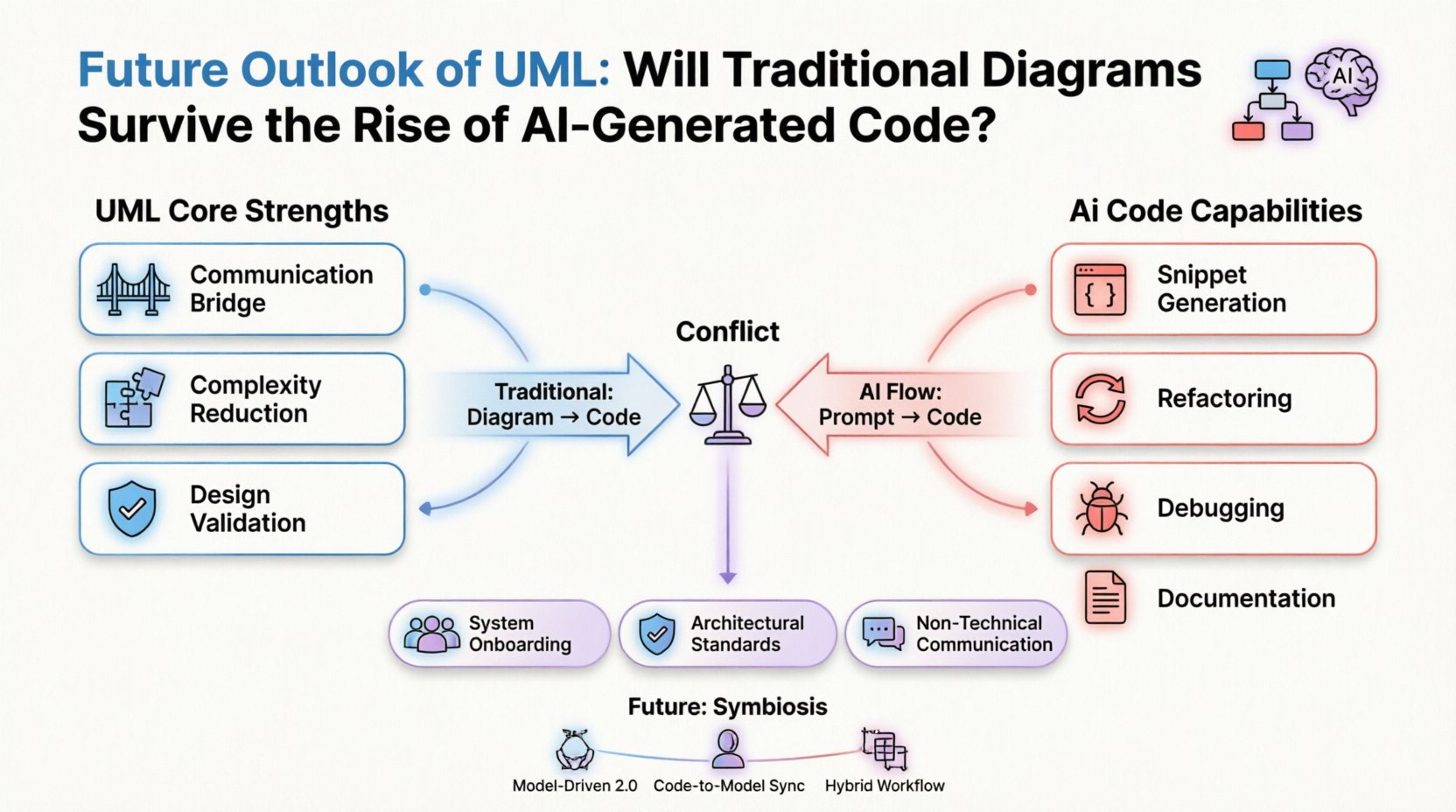
The Core Function of UML in Modern Engineering 🏗️
To understand the future, we must first understand the present utility of UML. It is often mistaken for a tool to generate code automatically. In reality, its primary strength lies in abstraction.
- Communication Bridge: UML translates technical logic into visual patterns that non-technical stakeholders can understand.
- Complexity Reduction: Large systems require decomposition. Diagrams break monolithic applications into manageable components.
- Design Validation: Before writing syntax, architects validate flow and state transitions to prevent logical errors early.
When AI generates code, it focuses on syntax and immediate functionality. It rarely captures the high-level architectural intent that a sequence diagram or class diagram provides. This distinction is crucial for the longevity of visual modeling.
The Rise of AI-Generated Code 🧠
Generative models are now capable of writing boilerplate, creating API endpoints, and even refactoring legacy systems. The speed of development has increased significantly. However, this speed introduces specific risks regarding system coherence.
Capabilities of Current AI Models
- Snippet Generation: Creating functions based on docstring descriptions.
- Refactoring: Modernizing codebases without changing external behavior.
- Debugging: Identifying logical errors and suggesting fixes.
- Documentation: Generating comments and README files from code.
While these capabilities are impressive, they operate on a micro-level. They optimize the lines of code, not necessarily the structure of the system. This creates a gap between what is built and how it is organized.
The Conflict: Code vs. Blueprint 📐
The tension between AI-generated code and UML stems from the direction of information flow.
- Traditional Flow: Diagram (UML) → Code. The design dictates the implementation.
- AI Flow: Prompt → Code. The implementation dictates the understanding.
When code is generated directly from prompts, the resulting architecture often lacks a cohesive visual map. Developers are left with functional modules that are difficult to visualize as a whole system. This is where traditional diagrams regain their importance.
Why Diagrams Remain Essential 🗺️
Even with advanced code generation, certain human cognitive tasks require visual representation. AI cannot currently replace the human need for context and spatial understanding of a system.
1. System Onboarding and Knowledge Transfer
New team members struggle to understand complex codebases. Reading thousands of files is slow. A well-maintained architecture diagram allows them to grasp relationships between modules in minutes. AI can summarize code, but it cannot replace the spatial overview provided by a diagram.
2. Architectural Governance
Large organizations enforce standards to prevent technical debt. Visual models serve as a contract for how the system should behave. AI might generate code that works but violates architectural principles. Diagrams act as the guardrail for these standards.
3. Non-Technical Communication
Product managers and clients rarely understand class structures. They understand flows and states. Sequence diagrams and use case diagrams translate technical constraints into business logic. AI-generated code does not solve this communication barrier.
Future Scenarios for Modeling 📈
UML is not disappearing. It is evolving. The future lies in a symbiotic relationship between visual models and automated code generation.
Scenario A: Model-Driven Development 2.0
In this scenario, UML diagrams become the source of truth. AI tools read the diagrams and generate the corresponding code. This reverses the current trend where code is king. If the diagram is the blueprint, AI ensures the construction matches the plan perfectly.
Scenario B: Code-to-Model Synchronization
As code is generated or modified, AI tools automatically update the diagrams. This keeps documentation in sync with the implementation. This solves the biggest issue with UML: outdated documentation.
Scenario C: Hybrid Workflows
Teams will use AI for rapid prototyping and UML for final architecture. Early stages might rely on prompts to generate structure, while critical subsystems require formal diagrams to ensure reliability and security.
Comparative Analysis: Traditional vs. AI-Driven Approaches 📊
| Feature | Traditional UML Workflow | AI-Generated Code Workflow |
|---|---|---|
| Speed | Slower initial setup, faster long-term maintenance | Fast initial setup, slower long-term maintenance |
| Accuracy | High (Human verified) | Moderate (Requires review) |
| Visual Clarity | Excellent for high-level overview | Poor (Code is dense and linear) |
| Flexibility | Rigid (Changes require model updates) | High (Code adapts quickly) |
| Context Retention | High (Captures intent) | Low (Focuses on syntax) |
The Skill Shift for Engineers 🛠️
As the tools change, the required skills for software engineers must also evolve. The focus shifts from memorizing syntax to understanding system behavior.
- Systems Thinking: Ability to see the whole picture rather than individual functions.
- Diagram Literacy: Reading and creating visual models to communicate complex ideas.
- AI Prompt Engineering: Knowing how to instruct AI to generate code that fits the architectural model.
- Quality Assurance: Verifying that AI-generated outputs meet security and performance standards.
Engineers who can bridge the gap between visual design and automated implementation will be in high demand. They will ensure that the speed of AI does not compromise the stability of the software.
Challenges in the Transition ⚠️
Adopting this hybrid future is not without obstacles. There are significant hurdles to overcome before UML and AI can work seamlessly together.
1. Tooling Fragmentation
Currently, many diagramming tools and AI coding assistants operate in silos. Integration is limited. Developers often have to manually copy data between environments. This friction reduces the likelihood of widespread adoption of synchronized workflows.
2. Ambiguity in Natural Language
AI relies on prompts. Natural language is inherently ambiguous. A prompt might result in code that works but violates the intended design. Without a strict visual model to reference, the AI has no constraint to prevent architectural drift.
3. Maintenance Overhead
If diagrams are not automatically updated, they become liabilities. Teams may stop drawing diagrams because they cannot keep up with the code changes. The value proposition of UML relies on accuracy, not just existence.
The Role of Model-Driven Engineering (MDE) 🔄
Model-Driven Engineering is the methodology that connects diagrams to code. Historically, MDE tools were slow and complex. AI changes this dynamic.
- Forward Engineering: Generating code from models using AI logic.
- Reverse Engineering: Creating models from existing code using AI analysis.
- Round-Tripping: Ensuring changes in code update the model and vice versa.
AI makes round-tripping more feasible. It can analyze the semantic meaning of code blocks and map them back to visual nodes. This closes the loop between design and implementation.
Security and Compliance Considerations 🔒
In regulated industries like finance and healthcare, documentation is a legal requirement. AI-generated code must be auditable.
- Traceability: UML diagrams provide a traceable link from business requirements to code.
- Compliance: Auditors need to see how data flows through the system. Code alone is often too granular.
- Liability: If AI code fails, the human architect must be able to point to the design decision that led to the failure. Diagrams provide this accountability.
Recommendations for Teams 📝
Organizations should not abandon UML but rather adapt its usage to the new reality.
- Prioritize High-Level Design: Focus on class and sequence diagrams for critical subsystems. Do not diagram every function.
- Automate Documentation: Invest in tools that update diagrams from code repositories automatically.
- Train Teams: Ensure developers understand the value of diagrams beyond just code generation.
- Integrate AI Carefully: Use AI to assist diagramming, not replace the thinking behind it.
Final Thoughts on the Industry Trajectory 🔮
The software industry is at a pivot point. The ease of writing code has never been higher, but the complexity of managing systems has also increased. UML provides the structure needed to manage this complexity.
Traditional diagrams will not vanish. They will become more specialized. Instead of documenting every line of code, they will document the critical paths, security boundaries, and data flows. AI will handle the syntax, while humans will handle the architecture.
Those who view UML as a legacy burden will miss the strategic advantage of visual planning. Those who view AI as a magic wand will face the consequences of unmanaged technical debt. The future belongs to those who combine the precision of modeling with the speed of automation.
The survival of UML depends on its ability to adapt. It is no longer just a notation for code. It is a language for system thinking. As long as software systems require human understanding and collaboration, visual modeling will remain a vital component of the engineering lifecycle.
Related posts:
 Visual UML: A Step-by-Step Walkthrough for Junior Developers to Design Scalable Systems
 Common Mistakes in UML Activity Diagrams: Why Your Process Flows Are Confusing Stakeholders
 Tutorial: Designing a Robust UML Component Diagram from Scratch for Microservices
 Comparison of UML Profiles: Extending Standard Notation for Domain-Specific Architectures