


The Unified Modeling Language (UML) serves as the foundational standard for software architecture. However, general-purpose modeling often falls short when addressing complex, specialized domains. This is where UML Profiles become essential. Profiles allow architects to extend the standard notation without altering the core specification. This guide explores how profiles enable domain-specific architectures, comparing standard extensions and providing a framework for custom implementation.
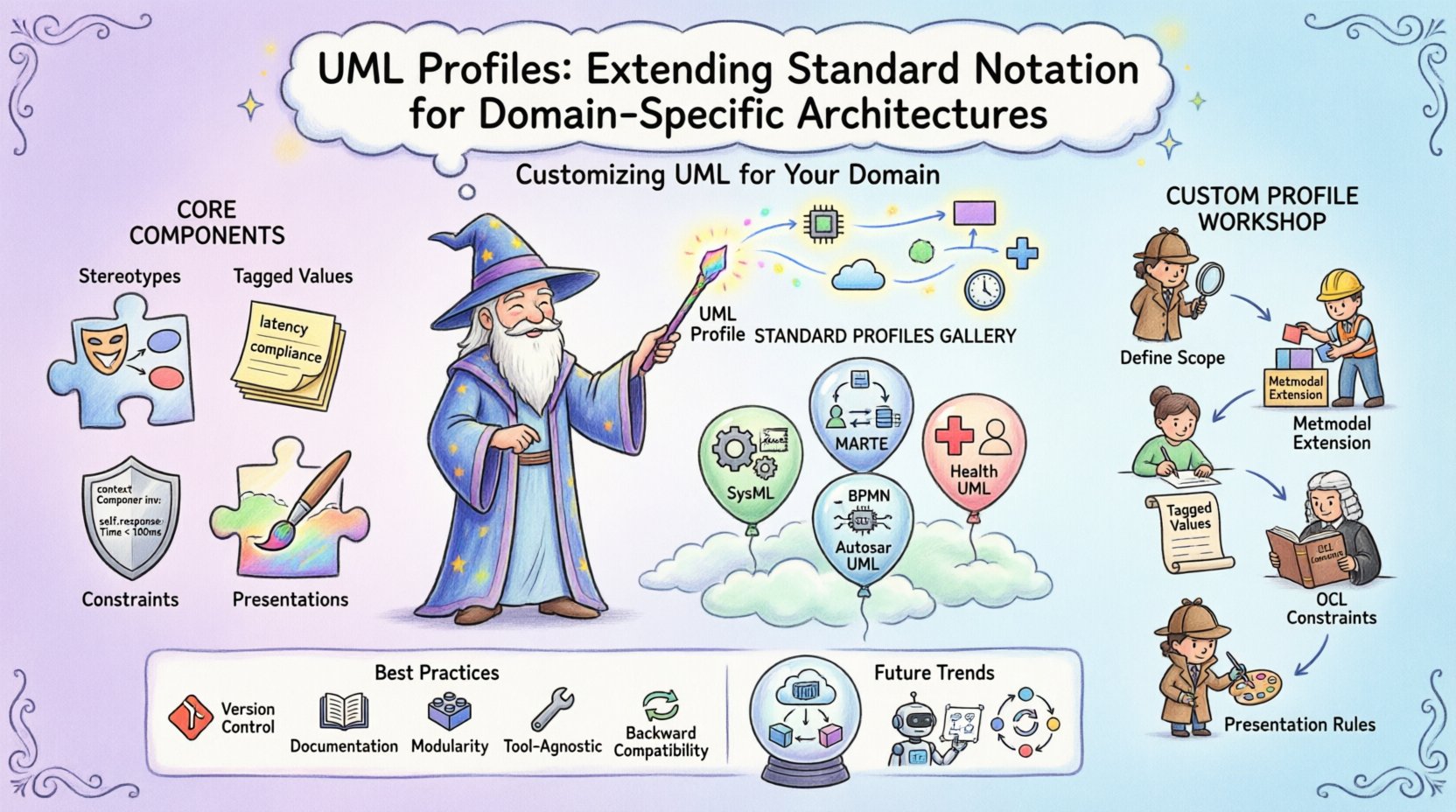
🧩 Understanding UML Profiles and Their Purpose
A UML profile is a mechanism to specialize the UML metamodel for a specific purpose. It does not create a new language but rather extends the existing one. Think of it as a custom toolkit layered over the standard UML foundation. When a project operates within a specific domain, such as automotive systems or healthcare, the generic diagrams of UML 2.x may lack the necessary semantics.
Profiles bridge this gap by adding:
- Stereotypes: New types of model elements that inherit from base UML classes.
- Tagged Values: Additional properties attached to model elements.
- Constraints: Rules that restrict how model elements can be combined or used.
- Presentations: Custom notations for diagrams and icons.
By using profiles, architects maintain compatibility with UML tools while injecting domain-specific meaning. This ensures that diagrams remain readable to UML practitioners while conveying precise information relevant to the industry.
⚙️ Core Components of a UML Profile
To understand how a profile functions, one must examine its structural components. A profile is itself a model that extends the UML metamodel. It is typically defined in a package structure that references the core UML definitions.
1. Stereotypes
Stereotypes are the most visible extension. They allow you to mark an element with a specific meaning. For example, a standard <<Component>> might be too generic for an embedded system. A profile could define <<HardwareComponent>> or <<SoftwareComponent>>. This distinction clarifies deployment and resource allocation during the design phase.
2. Tagged Values
Tagged values provide metadata. They attach key-value pairs to model elements. In a financial architecture, a tagged value might specify transaction latency or compliance level. These values do not change the visual shape of the diagram but provide data for analysis tools and code generators.
3. Constraints
Constraints enforce rules using Object Constraint Language (OCL) or natural language. A profile might define that a specific interface must implement a certain set of methods. This reduces ambiguity and ensures that the model adheres to architectural patterns required by the domain.
4. Presentations
Presentations define how elements appear. While standard UML uses rectangles for components, a profile might introduce specific icons for safety-critical modules. This visual distinction aids rapid comprehension during code reviews and system inspections.
🌐 Standard UML Profiles Across Industries
Several standard profiles exist to address common architectural needs. These are maintained by industry bodies rather than individual vendors. Using these standard profiles ensures interoperability between different organizations.
System Modeling Language (SysML)
While often treated as a separate language, SysML is technically a UML profile. It extends UML to support systems engineering. It adds blocks for hardware and software, requirements diagrams, and parametric diagrams for performance analysis.
Modeling and Analysis of Real-Time and Embedded Systems (MARTE)
MARTE focuses on resource-constrained environments. It introduces concepts for real-time scheduling, power consumption, and thermal analysis. This is vital for embedded systems where timing and energy are critical.
Business Process Model and Notation (BPMN)
Though distinct, BPMN concepts often integrate with UML profiles to map business logic to system architecture. A profile might link business activities to system components, ensuring traceability from requirement to implementation.
📊 Comparison of Common UML Profiles
The following table compares the primary characteristics of widely used profiles. This comparison highlights how different domains prioritize specific modeling features.
| Profile Name | Primary Domain | Key Extension | Typical Use Case |
|---|---|---|---|
| SysML | Systems Engineering | Blocks, Requirements | Complex hardware-software integration |
| MARTE | Embedded Systems | Resource, Timing | Real-time performance modeling |
| UML-S | Software Engineering | Deployment, Interfaces | Service-oriented architecture |
| Autosar UML | Automotive | ECU, Network | Automotive software architecture |
| Health UML | Healthcare | Patient, Treatment | Medical device modeling |
🛠️ Creating a Custom UML Profile
When standard profiles do not fit, architects create custom profiles. This process requires a disciplined approach to ensure the profile remains maintainable and compatible with the core language.
Step 1: Define the Scope
Identify the specific domain needs. Does the project require specific performance metrics? Are there regulatory constraints? Define the problem statement clearly before adding model elements.
Step 2: Extend the Metamodel
Start by extending the UML metaclass. For instance, if you need a specific type of interface, extend the Interface metaclass. Define the stereotype name and the base element it extends.
Step 3: Add Tagged Values
Identify the metadata that must accompany the new element. Add tagged values for properties like version, author, or criticality level. Ensure these values are documented for future maintainers.
Step 4: Implement Constraints
Write OCL constraints to enforce business rules. For example, ensure that a specific component cannot be instantiated more than once. This prevents architectural anti-patterns from entering the design.
Step 5: Define Presentation
Create custom icons or shapes. While standard UML tools support basic shapes, a profile allows for specialized representations. This improves readability for domain experts who are not UML specialists.
📋 Best Practices for Profile Management
Managing profiles over the lifecycle of a project is critical. Poorly managed profiles lead to model fragmentation and confusion.
- Version Control: Treat profiles as code. Use version control systems to track changes to the profile definition itself.
- Documentation: Maintain a profile specification document. Explain the intent of every stereotype and tagged value.
- Modularity: Keep profiles modular. Avoid creating one massive profile. Instead, create separate profiles for different concerns, such as security, performance, and deployment.
- Tooling Agnosticism: Ensure the profile works across multiple modeling tools. Avoid proprietary extensions that lock you into a single vendor ecosystem.
- Backward Compatibility: When updating a profile, ensure older models can still be read. Add new elements as extensions rather than modifying existing base definitions.
⚠️ Challenges and Limitations
While profiles offer flexibility, they introduce complexity. Architects must be aware of the potential pitfalls.
Tooling Support
Not all modeling tools support profile extensions equally. Some tools may render stereotypes as plain text, losing the visual distinction. Others might not support tagged values or custom constraints. Testing the profile on the target tooling environment is mandatory.
Learning Curve
New stakeholders must learn the custom profile. If the profile is too complex, it hinders collaboration. Keep the profile minimal. Add features only when they provide clear value.
Interoperability
Sharing models between teams using different profiles can be difficult. If Team A uses a custom profile for security and Team B uses a different one, merging models becomes a manual task. Standardize where possible.
Maintenance Overhead
Custom profiles require ongoing maintenance. As the project evolves, the profile must evolve. Neglecting this leads to outdated models that no longer reflect the system.
🔗 Integration with Model-Driven Architecture
Profiles are a cornerstone of Model-Driven Architecture (MDA). In MDA, models are transformed into code. Profiles provide the necessary semantic information for these transformations.
- Code Generation: Stereotypes can map directly to programming constructs. A
<<Singleton>>stereotype might generate a specific design pattern in the code. - Validation: Constraints in the profile validate the model before code generation. This catches errors early in the development cycle.
- Traceability: Tagged values link model elements to requirements. This ensures that every line of code can be traced back to a system requirement.
🚀 Future Trends in UML Extension
The landscape of modeling is evolving. Future developments focus on automation and integration.
Dynamic Profiles
Static profiles define the structure at design time. Dynamic profiles allow the model to adapt based on runtime data. This is relevant for self-healing systems that change their architecture based on load.
Cloud-Native Architectures
As systems move to the cloud, profiles are adapting. New stereotypes focus on microservices, containers, and serverless functions. These profiles help architects visualize distributed systems that lack a physical boundary.
AI-Assisted Modeling
Artificial Intelligence is beginning to assist in profile creation. AI can suggest stereotypes based on project context. It can also validate constraints automatically, reducing the manual effort required to maintain model quality.
📝 Summary of Key Takeaways
UML profiles are a powerful mechanism for tailoring the modeling language to specific needs. They allow architects to preserve the benefits of UML while addressing domain constraints. By extending the metamodel with stereotypes, tagged values, and constraints, teams can create models that are both standard-compliant and domain-relevant.
Success depends on disciplined management. Profiles must be documented, versioned, and tested. Avoid over-engineering. Start with the essential extensions and add complexity only when necessary. This approach ensures that the modeling effort supports the architecture rather than becoming a burden.
🧭 Implementation Checklist
Before deploying a new profile in your organization, review the following checklist:
- ☑ Define Requirements: What specific information is missing from standard UML?
- ☑ Check Standards: Is there an existing standard profile that fits the need?
- ☑ Validate Tools: Does your modeling tool support the required extensions?
- ☑ Train Team: Have the architects and developers been trained on the new notation?
- ☑ Document: Is the profile specification published and accessible?
- ☑ Review: Is there a process for reviewing and approving profile changes?
Adopting UML profiles requires a shift in mindset. It is not just about drawing diagrams; it is about defining the language of the system. When done correctly, profiles enhance communication, reduce errors, and streamline the path from design to implementation.
Related posts:
 The Complete Component Breakdown of UML Class Diagrams for Intermediate System Analysts
 Q&A with Senior Architects: Answering Tough Questions About UML in Modern DevOps Pipelines
 Best Practices for UML Timing Diagrams: Capturing Precision in Real-Time System Interactions
 Tutorial: Creating Effective UML State Machine Diagrams for Event-Driven Architectures